Where your Binance stock order goes: sessions, queues, DAY vs GTC
The choices on the order screen (RTH or ETH, DAY or GTC) don't decide your fee. They decide which hours your order is allowed to trade in. An order that just sits there is, most of the time, waiting in line for the next open. This piece follows the order screen from top to bottom: the hours of the four sessions, what state market and limit orders are in during each, how GTC's 90-day cap works, and how soon you can use the money after you sell.
Short answer: an order that isn't moving usually isn't stuck. It's waiting in line, according to the trading session you picked when you placed it. Binance's stock trading splits the week into sessions. Market orders only actually trade during regular hours, and anything submitted outside them waits for the next open. Whether a limit order can fill pre-market or after-hours depends on whether you chose RTH, ETH or 24-hour trading, and how long it can stay open depends on DAY versus GTC. Rules checked as of September 2026.
"Why hasn't this filled?" is much quicker to answer if you split it into two layers. Layer one: is your order eligible to trade right now? The session and the time-in-force decide that. Layer two: once it's eligible, has the price lined up? That comes down to the price you entered and the order book at the time. Most "it sat there all night" cases are stuck at layer one and have nothing to do with the market. Below, we take things in the order you meet them on the order screen: first telling the product lines apart, then the session table, then market orders, the two time-in-force options and stop limit orders, and finally when you can use the money after a sale.
The sessions, time-in-force rules and settlement described below all belong to the stock trading service on the Binance platform provided by Nest Trading Limited. Binance states that availability of the service and its features varies by jurisdiction, and that users in some markets can't access it at all. Being able to see the page doesn't mean it's available where you live. The rules here are summarized from Binance's Help Center explainer as updated in mid-September 2026; whatever the order screen shows when you place your order takes precedence. This article doesn't recommend any stock and isn't investment advice.
Real shares here; bStocks run on different rules
More than one thing on Binance has to do with US stocks, so before you do anything, check which one you've actually opened. This article is about Binance Stock Trading, and Binance's own description is plain: the service is provided by Nest Trading Limited, works in collaboration with an external brokerage, currently offers access to more than 7,000 listed stocks and ETFs, and lets eligible users start with a minimum of 5 USD. The shares you buy are held in custody by a partner brokerage, you are their beneficial owner, and where applicable you can receive dividends and take part in corporate actions. All of this is on Binance's Help Center page on stock trading, and every rule in this article comes from that same page.
The other line is tokenized products such as bStocks, and the session and time-in-force rules in this article don't apply to them. For how the two lines differ, see bStocks vs xStocks vs Alpha securities tokens. If what you hold is a tokenized product, don't apply the rules below to it.
One more thing to keep in mind: the same product comes with different features in different regions. When Binance says "availability of the service and its features will vary by jurisdiction," it means exactly that. Which features you get is whatever your own order screen shows. Something you see in someone else's screenshot may simply not exist for you.
The four sessions, and the "trading session" setting when you order
Binance describes the service as running up to 24 hours a day, 5 days a week (24/5), and qualifies that straight away: only selected stocks support 24-hour trading. Binance doesn't publish a list of which ones, and this article won't try to piece one together, so whether you can keep an order working through the overnight session depends on what your stock's page lets you select.
The trading session you choose when placing an order decides which sessions that order is live in. There are three settings:
- RTH (Regular Trading Hours): Market-Open only, i.e. the regular session.
- ETH (Extended Trading Hours): pre-market + regular + post-market.
- 24-Hour Trading: overnight + pre-market + regular + post-market.
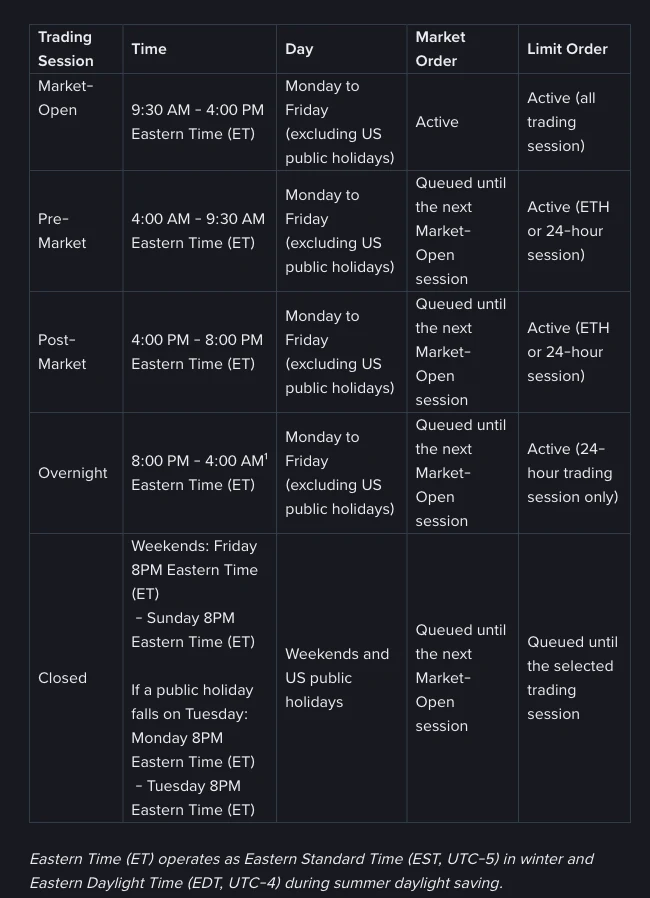
An order set to RTH won't fill pre-market. That's the range you set yourself. Here are the hours of each session and what happens to orders in each (all times Eastern Time, ET):
| Session | Time (ET) | Days | Market order | Limit order |
|---|---|---|---|---|
| Market-Open (regular) | 9:30 AM – 4:00 PM | Monday to Friday, excluding US public holidays | Active | Active (all three settings) |
| Pre-Market | 4:00 AM – 9:30 AM | Same as above | Queued until the next regular session | Active (ETH or 24-hour) |
| Post-Market (after-hours) | 4:00 PM – 8:00 PM | Same as above | Queued until the next regular session | Active (ETH or 24-hour) |
| Overnight | 8:00 PM – 4:00 AM next day | Same as above | Queued until the next regular session | Active (24-hour only) |
| Closed | Weekends: Friday 8:00 PM to Sunday 8:00 PM; if a public holiday falls on a Tuesday: Monday 8:00 PM to Tuesday 8:00 PM | Weekends and US public holidays | Queued until the next regular session | Queued until the session you selected |
ET isn't one fixed offset; it changes twice a year. Binance's page says it runs as Eastern Daylight Time (EDT, UTC-4) in summer and Eastern Standard Time (EST, UTC-5) in winter. So converting it to your own clock has two answers, not one number to memorize. Here are the sessions in UTC:
| Session | Summer (EDT), in UTC | Winter (EST), in UTC |
|---|---|---|
| Pre-market | 08:00 – 13:30 | 09:00 – 14:30 |
| Regular | 13:30 – 20:00 | 14:30 – 21:00 |
| Post-market | 20:00 – 00:00 next day | 21:00 – 01:00 next day |
| Overnight | 00:00 – 08:00 | 01:00 – 09:00 |
Add or subtract your own UTC offset from there. Across much of Asia, the US afternoon and evening land on your next day, so the regular open usually falls in your evening, while the overnight session, the one whose name sounds most like the middle of the night, lands in your daytime. When US clocks change in March and November, you switch from one column to the other, so every session moves by an hour on your clock. If your own country also observes daylight saving time, it usually changes on a different date, so the gap is off by an hour for a week or more in between. Those weeks are when people most often work out the open from memory and get it wrong.
This piece answers "what happens once the order is in." If you'd rather choose your timing from the sessions themselves (which ones are busy, where the spread is wider), we cover that separately in US stock trading hours on Binance: pre-market, after-hours, 24/7? The two work best read together.
Market orders: submit any time, but they only live in regular hours
In Binance's words: "You may place a Market order at any time, however it is only active during Regular Trading Hours (RTH)." So a market order submitted pre-market, after-hours, overnight or at the weekend isn't rejected, and it doesn't fill straight away either. It waits for the next Market-Open session. "The order went in" and "it's trading now" are two separate things here; an order that went through without an error isn't necessarily working yet.
Next comes the line people misread most: waiting in the queue doesn't mean you get the opening price. For market orders, Binance gives a single warning: slippage may occur due to market conditions. When your order reaches the next open, it gets whatever price is actually available in the order book at that moment, with a whole night of news and any price gap in between. A market order placed after Friday's close doesn't get its turn until Monday's open, and everything that happens over those two days goes into that fill. How thin the book is decides how far off it lands; our trading-hours guide covers that in its section on why the session you pick matters.
One more rule is tucked into the time-in-force options and is easy to skip: a market order's only time-in-force option is DAY, and DAY means the order expires at the end of the trading day if it hasn't filled. How a market order queued over the weekend lines up with "the trading day" isn't spelled out on that page, and I haven't turned it into a rule of my own. If you really need to place a market order before a long weekend, check its status on the order detail page after you submit.
DAY or GTC: how long each time-in-force lasts
Once you've entered a limit price, you also pick a time-in-force. Binance offers two:
- DAY: expires at the end of the trading day if not filled. It's the only option for market orders.
- GTC (Good-Til-Cancelled): remains active for up to 90 days, or until filled or cancelled.
90 days is a ceiling, not a promise that your order will last that long. Filled, cancelled or expired: whichever happens first is what counts. Park an order far from the current price to wait for a pullback and it will sit in your list for a long time, but not forever. After 90 days it expires on its own, possibly long after you've forgotten it was there. If you keep GTC orders running for a while, go back to the orders page now and then to see which ones are still open.
Binance adds a note: certain corporate actions may affect your GTC orders, and the details are on its separate Stock Trading Corporate Actions page. Check it before leaving a long-running order in place.
There's another limit readers run into often, even though it isn't really about time-in-force: the order price can't be more than 10% above or below the NBBO (National Best Bid and Offer) at the time you submit. Enter a price outside that band and the order is stopped at submission. That isn't "placed but not filled"; it never got placed at all. The two look completely different on screen, so don't troubleshoot them as the same problem. If you were hoping to park an extreme price to catch a crash, this is the limit you'll most likely hit.
On fractional shares, Binance's wording is that fractional trading is supported for selected stocks, again with no list. Whether your particular stock can be bought in fractions is whatever the order screen shows.
The two options solve different problems. DAY lets an order lapse at the end of the trading day, so it doesn't carry into the next one and you don't come back to a fresh session having forgotten what you left working. GTC keeps your order in line on days you aren't watching the market. Pick the one that fits how often you check your orders.
Stop limit orders: three restrictions, and a catch after the trigger
Stop limit orders differ from ordinary limit orders in three ways, all set out in the same paragraph on Binance's page:
- Time-in-force can be Day or GTC, but fractional shares are limited to Day. Binance says this in the stop limit section specifically, so don't stretch it into "fractional shares can never use GTC." That's a different claim.
- No extended-hours trading. Binance lists extended-hours trading as not supported, so plan on it working in regular hours (RTH); the page doesn't mention the overnight session separately.
- No notional orders. That's the "buy $100 worth" way of ordering. This order type doesn't accept it, so you enter a number of shares instead.
Binance is specific about what counts as a valid setup: for a buy, the stop price must be above the last price and the limit price at or above the stop price; for a sell, the stop price must be below the last price and the limit price at or below the stop price. An order that doesn't meet those conditions isn't valid.
This paragraph contains one sentence worth remembering word for word: "Triggering a Stop Limit order does not guarantee execution." The case Binance describes is this: if the market moves quickly, gaps past your limit price, or reverses after the order is triggered, the order may stay open until the price comes back to your limit, or until you cancel it or it expires. Put another way, a stop limit order controls the worst price you'll fill at; it can't stop the price from running away from you. Treating those two as the same thing is the most common misuse of this order type.
After you sell: when can you use the money?
Start with the form the money takes. Stock purchases are primarily made with USDC. BNB, USDT, U and USD1 are also supported and are automatically converted to USDC when you submit the order. The assets have to be held in your Funding Account or Spot Account. Sale proceeds are always credited as USDC to your Funding Account, and any unused funds go back to the Funding Account too. So if you sell and then go looking for the money in your Spot Account, you're probably looking in the wrong place.
The key line is about settlement: "Before settlement is completed, proceeds from Sell orders can only be used for spot, stock trading and earn subscriptions." Anything beyond those three has to wait until settlement finishes. If you're selling shares to move the money somewhere else right away, this directly affects your timing.
How long does settlement take? Binance leaves itself some room here: the settlement date shown for a GTC limit order is only an estimate, because the order has to fill first, and Binance only says the next settlement cycle may fall in the range of T+1 trading day. Go by what the order detail page shows.
Fees in brief: there's no commission, but orders with a trade value of 350 USD or less carry a minimum platform fee of 0.35 USD, while above 350 USD the platform fee is waived and a 0.1% spread is charged instead. These are the standard rates on the Help Center page; if a promotional rate is running, the fee breakdown in the order preview shows what you'll actually pay. The full cost structure is a topic of its own. What you actually take home only adds up once you count these alongside the fill price. Our piece on tokenized US stock P&L and the hidden costs works its examples on the tokenized side, but the way it does the maths carries over fine.
Back to the question we started with. When an order isn't moving, running through this list usually gives you the answer: which trading session you picked, which session it is right now, whether the time-in-force is DAY or GTC, how far your price is from the order book, and what status the order detail page shows. If all five check out and it still doesn't make sense, then start wondering whether it's a system problem. Most of the time you won't get that far.