The full Binance KYC process: every step, and every place it snags
Once the account is registered, the thing that actually keeps people at the door is identity verification. Some pass on the first try; others get bounced back over and over and burn an afternoon still not done. This breaks Binance KYC down from preparing documents to the face check and proof of address, then review and rejection reasons — walk it in order, and we flag what to watch for in advance.
What an unverified Binance account can and can't do
Without verification, a Binance account can barely do anything. Binance states that new users must complete standard identity verification before using its products and services, deposits and trading included, so a new account that skips it can't deposit or trade. Older accounts that never finished verification are limited to withdrawals. Once you're verified, your deposit and withdrawal limits depend on your verification level, which you can check on the Identification page.
KYC stands for "know your customer." It's a common anti-money-laundering and counter-terrorism-financing requirement across jurisdictions, the same reason a bank asks for your ID when you open an account. If you want to read up on the concept, see the Wikipedia entry on KYC.
There's an upside people overlook, too: once you're verified, the account is bound to your own document, and if you ever hit an account problem or need to appeal and recover it, that's much smoother to handle. Conversely, if you used someone else's document or entered a mess of details, appealing when something goes wrong is a nightmare. So using your own real, accurate information from the start is a favor to your future self.
And a misconception to clear up: some people worry "if I verify, will I be less safe?" The real risk was never "you verified" — it's "you handed your document or password to someone you shouldn't have," like trusting a stranger who offered to "verify for you" or "get you through the check." Do verification yourself, only on the official site or app, never through anyone else.
Which documents to prepare first
Before you start, gather everything you'll need in one go, so you're not hunting for things mid-process. Charging ahead without it all together is often the first reason for a rejection.
- One valid document. National ID, passport, or driver's license — pick one, but it must be in date; anything expired is rejected outright. If you have a passport, it often reads most smoothly because the format is internationally standardized.
- The document holder present. There's a face/liveness check ahead that you have to complete in front of the camera yourself — no one can stand in for you.
- Good lighting. Photographing the document and your face both hate backlight, dimness, and glare. Find a spot with even light — not in harsh sun, not in the dark.
- Be ready for the info to match. The name, date of birth, and document number you enter have to match the document exactly. Sounds trivial, but it's a top reason for rejection.
If you plan to do advanced verification later, you'll need one more thing: a document proving your residential address, such as a recent utility bill or bank statement from the last few months. We cover this below; just know it's coming so you're not scrambling for it later.
Pick one of national ID, passport or driver's license, going by what the verification page lists for your country or region of residence; if your ID keeps failing to read, a passport is the backup. Choose whichever you have that's clearest, most current, and most complete — don't use an old document with worn corners or a blurry photo.
The name you verify with should ideally match the bank card and C2C receiving/paying name you'll use for deposits later. If all three line up, your odds of a C2C risk flag drop a lot. If they don't, you've planted a landmine right here at the verification step.
Basic verification: choose your ID, upload it, confirm your details
Binance's verification is usually tiered, and the exact names differ between versions, but it's broadly two layers: "basic" and "advanced." The basic tier (often called Lv1 or standard verification) is the threshold everyone clears first, and finishing it opens up most everyday features; the advanced tier (Lv2) raises your limits further. This section covers the basic tier. For the exact tier names and matching limits, go by whatever Binance's official help center currently states.
First: pick your residence and document type
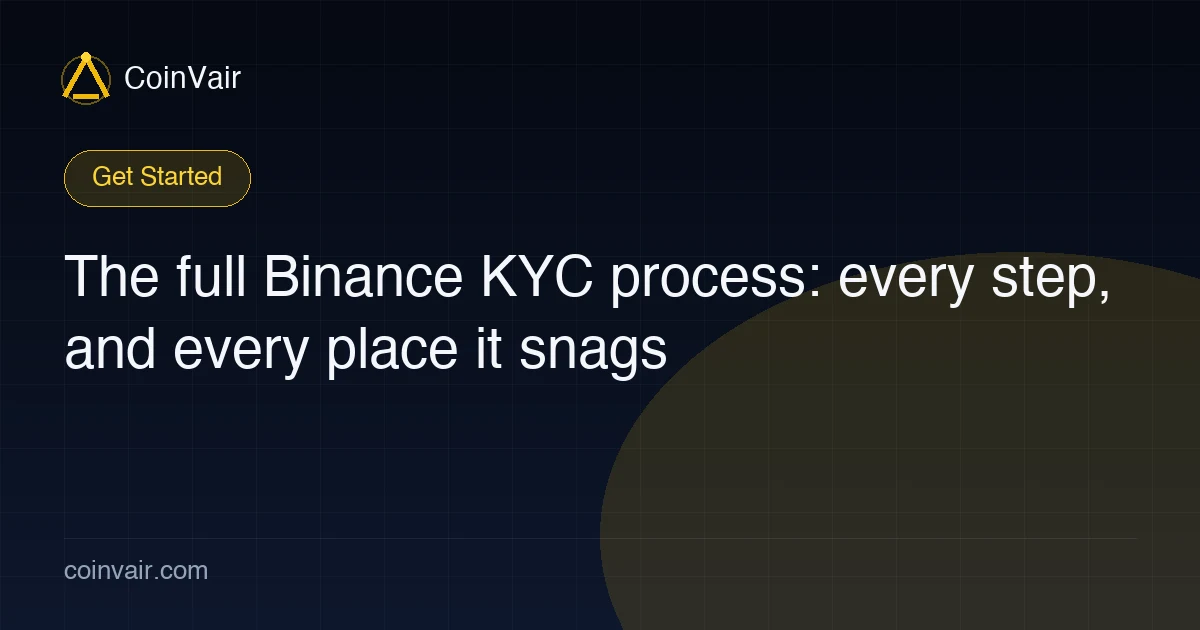
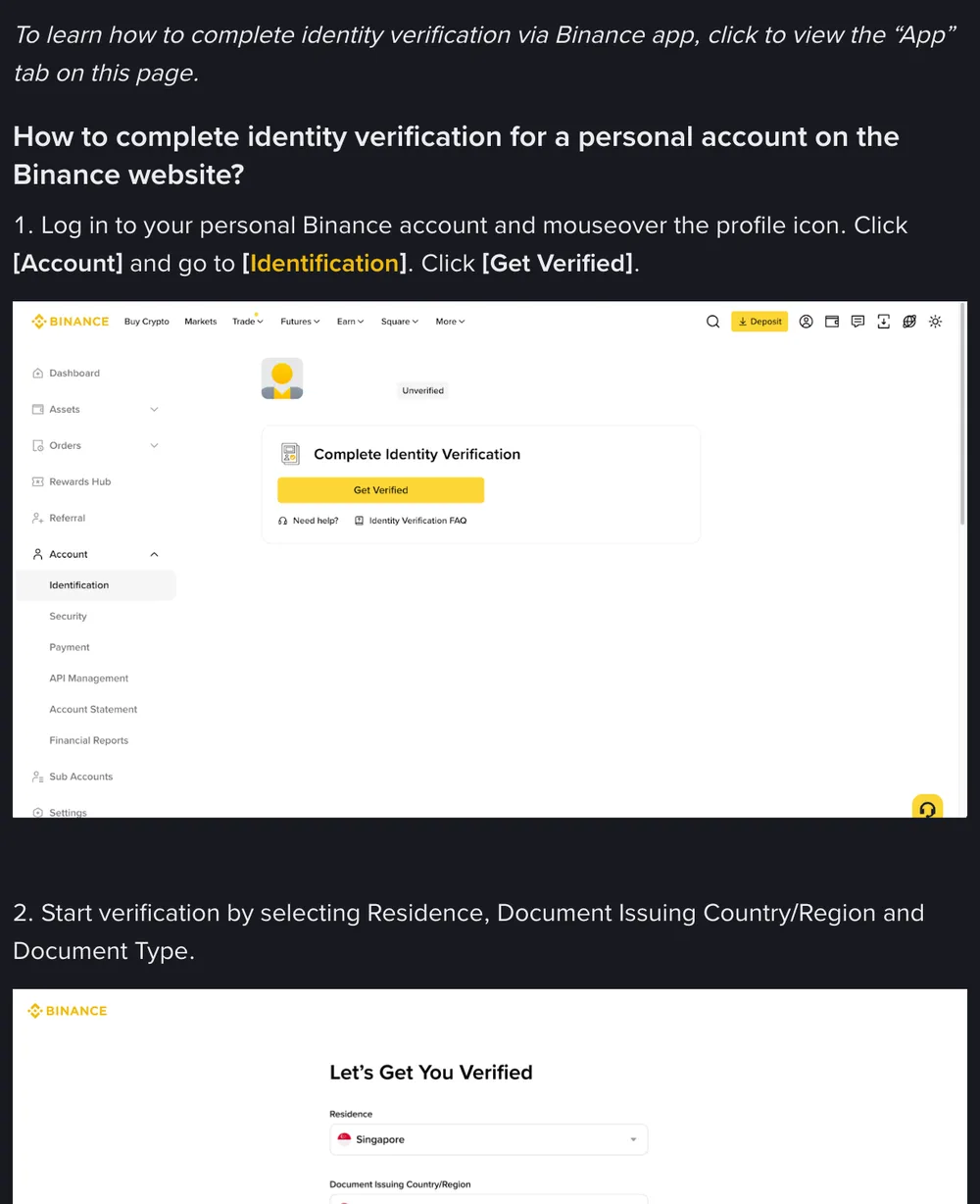
On the website, go to Account → Identification and click Get Verified. Select your residence and the document's issuing country/region, then the document you're using (national ID / passport / driver's license).
Second: upload the document, then confirm your details
Take photos or upload the document as prompted. It usually asks for the front and back, and sometimes for a shot of you holding it. While shooting, watch these:
- All four corners in frame. The document's border should sit fully inside the frame — don't crop a corner off.
- Text legible. Key fields — document number, name, expiry — must be readable, not blurry.
- No glare. The document surface reflects easily and covers the details; change the angle, avoid direct light.
- No re-shot copies. A photo of a photocopy, or a shot of a document image on a screen, usually won't pass — you have to photograph the physical document itself.
After upload, the system reads the document automatically and moves you on to the face check. Once that's done, the page lists your name, date of birth, nationality, document number and so on for you to confirm. What matters most here: every field has to match the document exactly. Name order, whether there's a middle name, the spelling — all off the document. Binance states these details can't be changed once confirmed, and plenty of people click through carelessly to save time — this is exactly where they trip.
Put a dark, matte surface underneath and hold the phone right above the document. Daylight from a window is steadier than an overhead lamp. Turn the flash off; on a laminated card it tends to leave a white blotch.
Passing the face/liveness check
The face check (also called liveness detection) confirms that the document really is yours. It compares your face right now against the document photo, while confirming there's a live person in front of the screen and not a photo or video. The technique is called liveness detection — you don't need to understand how it works, just follow the prompts.
It usually goes: facing the camera, follow the on-screen prompts — blink, open your mouth, turn your head, or read out a string of numbers. To pass first time, watch these:
- Take off anything covering your face. Mask, hat, reflective glasses — off, so your face shows fully.
- Light on your face. Don't sit in a backlight or leave your face in shadow; even, front-on light is best.
- Follow the prompts. Blink when it says blink, turn your head slowly when it says turn — don't jump ahead or add extra movements.
- Natural expression. Don't force wide eyes or a big grin; just your normal face.
- Keep your hands steady. Hold the phone still, or brace it against something — don't let the frame shake.
When the face check fails, it's usually the environment, not that you "don't look like yourself": too dark, something covering your face, or you didn't keep up with the prompts. Fail a few in a row, move to a better-lit spot, take off the glasses and mask entirely, and retry — that usually fixes it. Binance's own prompt asks you not to wear a hat or glasses or use filters; heavy makeup or dramatic colored contacts can interfere too, so keep it bare-faced or light to be safe.
Security basics: the face check belongs in Binance's official app or on the official site, nowhere else. If someone messages you a link offering to "redo your face scan," don't open it. Once your face data is out, you can't take it back.
Advanced verification: proof of address
Once you're past basic verification, most day-to-day operations are covered. But if you need higher deposit/withdrawal limits, or want access to certain advanced features, you may need advanced verification (Lv2), where the core extra step is submitting proof of address. Whether you need to do it, and how much your limits rise, depends on your own usage and Binance's current rules.
What counts as proof of address
Proof of address exists to back up that you "actually live where you said." Commonly accepted documents include:
- A utility bill — water, electricity, gas, broadband — from the last few months;
- A bank statement or credit card statement from the last few months;
- An official letter from a government body showing your name and address.
Which types are accepted and how recent they must be, go by whatever Binance's page currently lists. The common requirements are: the document must show your name and your full address together, that name and address must match your verification info, and the date must be within the valid window (usually the last three months, per the page).
One, the document is too old (past the window); two, the name or address on it doesn't match what you entered; three, it's photographed or scanned too poorly to read the key fields. Self-check against these three before you upload and you'll save yourself a round of rework.
Upload proof of address using clear original files where you can — an e-statement saved straight to PDF, or a full-page screenshot, is best. Don't crop out the institution name and date in the header or footer; those are exactly what the reviewer looks for. For a paper statement, lay it flat and shoot it clearly, same as photographing the document.
How long review takes
Once you submit, it's a waiting game. Basic verification usually comes back quickly when the info and photos are clear, and slower at peak times; advanced verification needs a human to look at the proof of address, so it generally takes a bit longer. The Binance Help Center says submitted documents are usually reviewed within 48 hours, though special cases can take longer — go by the status your page shows.
A few things not to do while you wait:
- Don't resubmit over and over. Submitting the same material repeatedly can actually scramble the review status and drag out processing. Submit once, and wait patiently for the status to update.
- Don't keep refreshing to hurry it. If the system is working, let it work — watching the refresh won't make it faster.
- Watch for notifications. The result usually reaches you by in-app message, email, or app notification; check whether they've asked you to supply anything more.
If the wait clearly exceeds the norm and the status sits frozen, then contact support through the entry inside the official site or app to ask. Binance doesn't speed up verification through private accounts, so block anyone who adds you offering to.
During a normal wait, don't bother support. Only when the status hasn't moved for a long time, or you got a "please supply more material" note you can't make sense of, go through the official support entry and explain your order/application clearly.
The most common reasons it's rejected
A basic-tier rejection usually traces back to the document photo: expired, a corner cut off, glare, or a shot of a copy or a screen, so the system can't read the fields. Next in line is the confirmation step, where the name's spelling or order, or the birth date, is off by one detail. An advanced-tier rejection is usually a bill that's past the time window, or a name and address that don't match your verification details. If you've been rejected, take the message on the verification page and work through Binance KYC won't pass? The most common reasons, and how to fix each one item by item.