Binance KYC won't pass? The most common reasons, and how to fix each one
Binance usually tells you why a verification was rejected. The 12 common reasons below fall into four groups: the document, the details you enter, the face check, and your account or region. Match the rejection message to a group, then read the fix.
5 traps with the document itself
Reason 1: document glare. This is the most common one. A document surface (laminated ones especially) blows out into a white patch under light, right where the document number and name sit, and the system can't read it. Fix: move somewhere with no direct light source, skip the flash, lay the document flat on a non-reflective surface, and shoot straight down from directly above — natural light is steadiest.
Reason 2: blurry or missing a corner. Shaky hands, missed focus, or you cropped off a corner while shooting, so the border's incomplete or the text is unreadable. Fix: hold the phone steady or brace it, confirm all four corners are fully in frame and the key fields are sharp, then take the shot. Look at it yourself afterward to check it's not blurry.
Reason 3: used a photocopy or a re-shot image. A photo of a document on a photocopy, or a shot of a document image stored elsewhere on a screen, usually won't pass. Fix: you have to photograph the physical document itself — original in hand, shoot it directly.
Reason 4: expired document. You used a national ID, passport, or driver's license that's already out of date. There's no way around this — the system only accepts in-date documents. Fix: use one that's within its validity; if all of yours are expired, renew the document first.
Reason 5: document type not supported, or wrong type selected. The type you chose doesn't match what you actually uploaded, or you used a local document that isn't on the supported list. Fix: select the right type as prompted; among the three mainstream documents (national ID / passport / driver's license), a passport often reads most smoothly because the format is internationally standardized, so try a passport when the ID keeps failing.
Non-reflective surface + even natural light + phone straight down from directly above + all four corners in frame + key fields sharp. Get these five right and document-related rejections become much rarer.
3 traps with the info you enter
Reason 6: name doesn't match the document. Wrong name order, a spelling error, a middle name missing or added — the system compares and rejects. This is especially common with a passport (which has a romanized name). Fix: enter it exactly as printed on the document — the surname/given-name order, the spaces, the capitalization, all copied across.
Reason 7: date of birth or document number entered wrong. A slip typing your birthday or document number one digit off, so it doesn't match. Fix: check it digit by digit against the document, don't fill it from memory — especially that long document number.
Reason 8: wrong country/region selected. The country you chose at registration or verification doesn't match your document or where you live, which affects the read and which features are available. Fix: select your real nationality/place of residence; don't fudge it to "unlock a feature" — fudging it stalls verification instead.
They all come from "filling it in fast and careless." Slow down for ten seconds here and check it against the document, and you save a whole round of rework. Your verification info should also ideally match the bank card and C2C receiving/paying name you'll use for deposits later — a lot less hassle down the line.
2 traps with the face check
Reason 9: environment or obstruction. Too dark, backlit, or wearing a mask, hat, or reflective glasses — the system can't see your face clearly. Fix: take off everything covering it so your face shows fully; find even front-on light, avoid backlight; keep the frame steady. This accounts for the vast majority of face-check failures.
Reason 10: didn't keep up with the liveness action. When it says blink, turn your head, or read numbers, you jumped ahead, added extra movements, or reacted too slowly to keep the rhythm. Fix: read the prompt, then act — slow down, follow the pace, keep your expression natural, don't force wide eyes or a big grin. Heavy makeup or dramatic colored contacts can interfere too, so keep it bare-faced or light for the check. For what liveness detection is, see the Wikipedia entry.
A security reminder: do the face check only in Binance's official app or on the official site. Any third-party page, any link from someone calling themselves "support" asking you to do a face check — treat it with suspicion, always. Your face is the most sensitive data there is; don't hand it over anywhere unfamiliar.
2 traps with the account and region
Reason 11: under the minimum age. Exchanges have a minimum age (usually you must be an adult). If you're under it there's no way through — this isn't an operational issue. Fix: you can't pass until you meet the age requirement; do not use someone else's document to get around it, which brings far more serious account and legal risk.
Reason 12: region restriction. In some countries or regions, some Binance services or verification are limited for regulatory reasons. Fix: this follows the official current policy for that region — it isn't solved by repeated retries. If you happen to be in one of those regions, don't keep banging on it; read the official help center notice for your region first.
One more edge case people overlook: the same document already registered. If a document has already been verified on another account, using it to verify a new one fails — the proper way is one verified account per person. If you simply forgot you already have an account, just recover the old one instead of rushing to open a new one.
Still rejected after all 12 checks? Send support the exact rejection message
If you've checked against all 12 above and ruled each out and it still won't pass, stop hammering the submit button — resubmitting the same material over and over can scramble the review status and stretch out processing. The right move here is:
- Write down the exact rejection message first. The reason the system gives usually points right at the problem — don't skip past it.
- Go through Binance's official support. Via the support entry inside the official site or app, give them the exact rejection wording and let them pinpoint it. Ignore any account that DMs you unprompted claiming to "expedite verification"; Binance support doesn't work that way.
- Try again at a different time, on a different network. Occasionally it's a busy system or a network hiccup causing a false failure, and a retry on a stable connection sometimes just works.
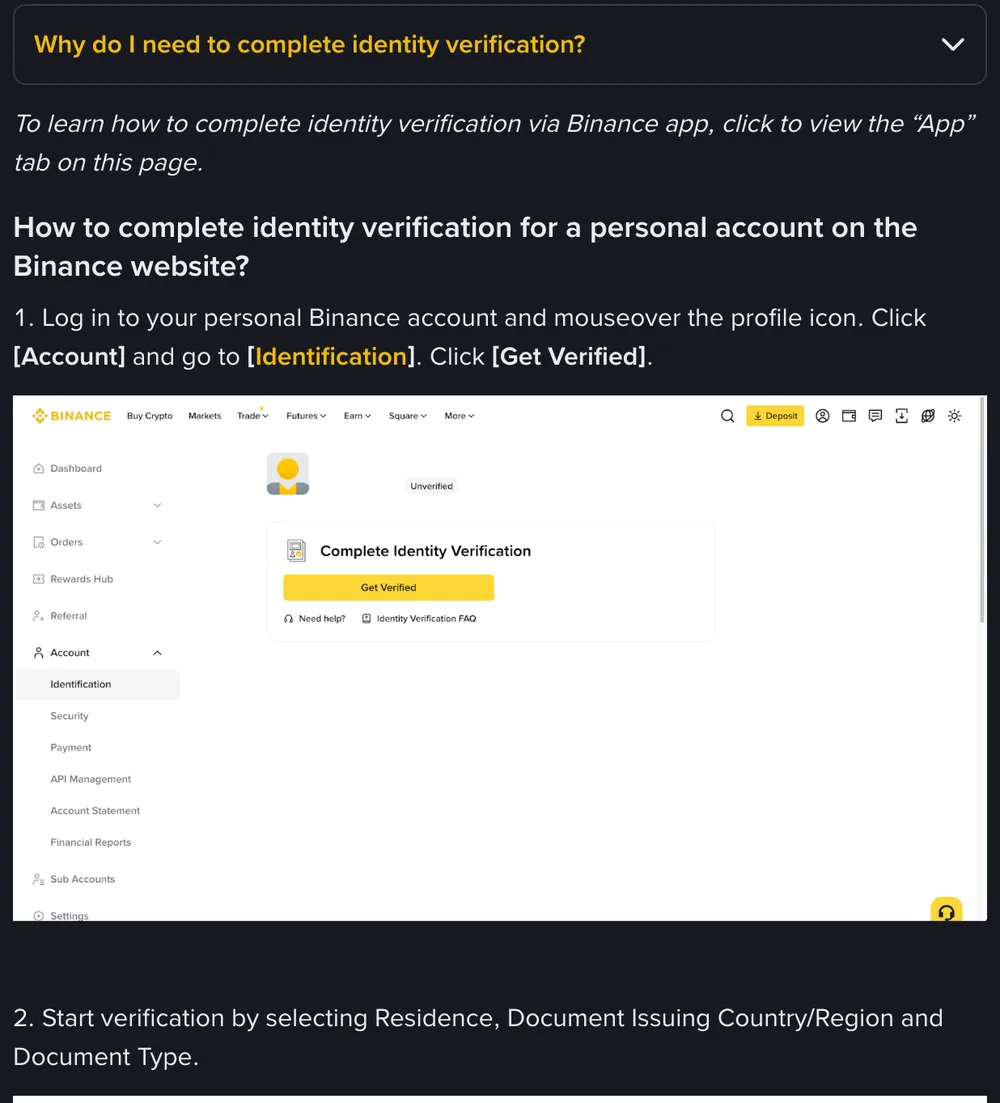
Most rejections come down to a photo the system can't read or details that don't match the document. To see the whole verification flow start to finish, go back to the full Binance KYC process; and if you haven't actually finished registering, read the complete Binance sign-up guide to get the account built first.